
Table of Contents
Intended Use Case and Outcomes
Process AI empowers machine Operators by harnessing the power of AI and presenting it in an easy to use package that provides real-time recommendations on how to reduce material and energy usage costs, as well as improve line speed.
The process setting recommendations are specific to each product/line combination at your factory. Oden combines real-time process data coming from machines with offline quality tests to develop a predictive model that can stream a prediction of your quality values on a second-by-second basis. Once the models are fully trained, Oden's predictions can achieve accuracy within +/- 5% of the actual quality test value.
The interface incentivizes operator engagement by automatically calculating the efficiency opportunity achievable through the recommendation. At the conclusion of the run, Process AI also provides a breakdown of the total cost savings captured.
Target Users
The Primary Users are Machine Operators who will receive and implement the recommendations on the line.
The Secondary Users are Supervisors or Process Engineers, who participate in the upfront configuration of recommendation parameters.
Primary Views
Process AI consists of three different views: Process Engineer View, Operator View, and Post Run Analysis.
Process Engineer View is used in the upfront configuration of recommendations during the implementation stage of the project. It offers filtering capabilities that allow the user to test different scenarios and see what recommendations the system will make.
Operator View is the primary view of Process AI, used by Operators to generate and implement the recommendations the system provides. It offers a simplified toolset to generate recommendations, but has a heavier emphasis on real time monitoring features to guide the implementation of process setting recommendations.
Post Run Analysis is Performed in specialized Oden Dashboards that offer historical breakdowns of past Process AI runs, allowing the user to see performance split out by Operator, Shift, Product, etc.
Key Features
- Process Engineer / Operator Toggle: Allows the user to change between the two views of Process AI
- Line/ Product Selector: Allows the user to select the Line and Product to receive recommendations for
- Historical Data Graph: Displays historical run data from the previous six months, along with the current run, on a cost/ speed axis.
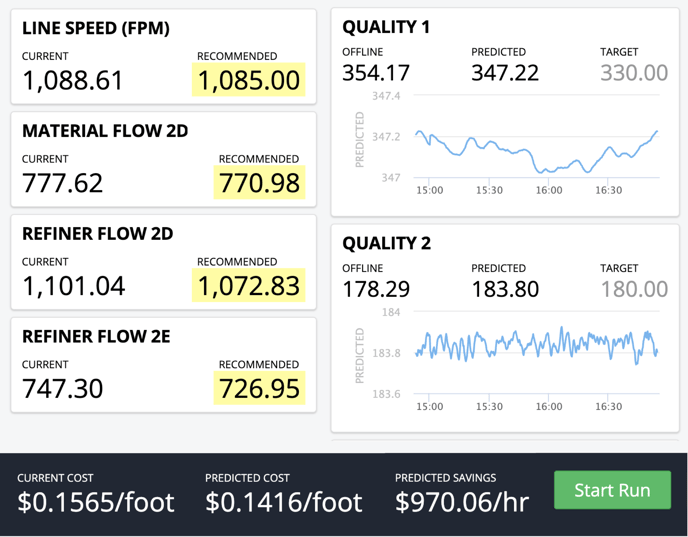
- Process Setting Tiles: Display process setting values that update in real-time alongside recommended values.
- Quality Metric Tiles: Displays the predicted value, the value of the last offline test, and a line chart of the previous two hours of the predicted value.
- Recommended vs. Selection Toggle: The user has the option of selecting any data point on the Historical Data Graph to view and implement that set of process settings values. The toggle switch allows the user to change between the default recommendation and the selection.
- Cost Savings Calculator: Before the Process AI run is started, displays the current cost per unit, the predicted cost per unit, and the total predicted savings per hour. After the run is started, it displays the current cost per unit, the total captured savings, and the total runtime.
- Start, Stop, and Update buttons: Allows the user to start and end the Process AI run. After the run is started the Start button changes to Update, which will generate a new set of recommendations without having to restart the run.
Workflow
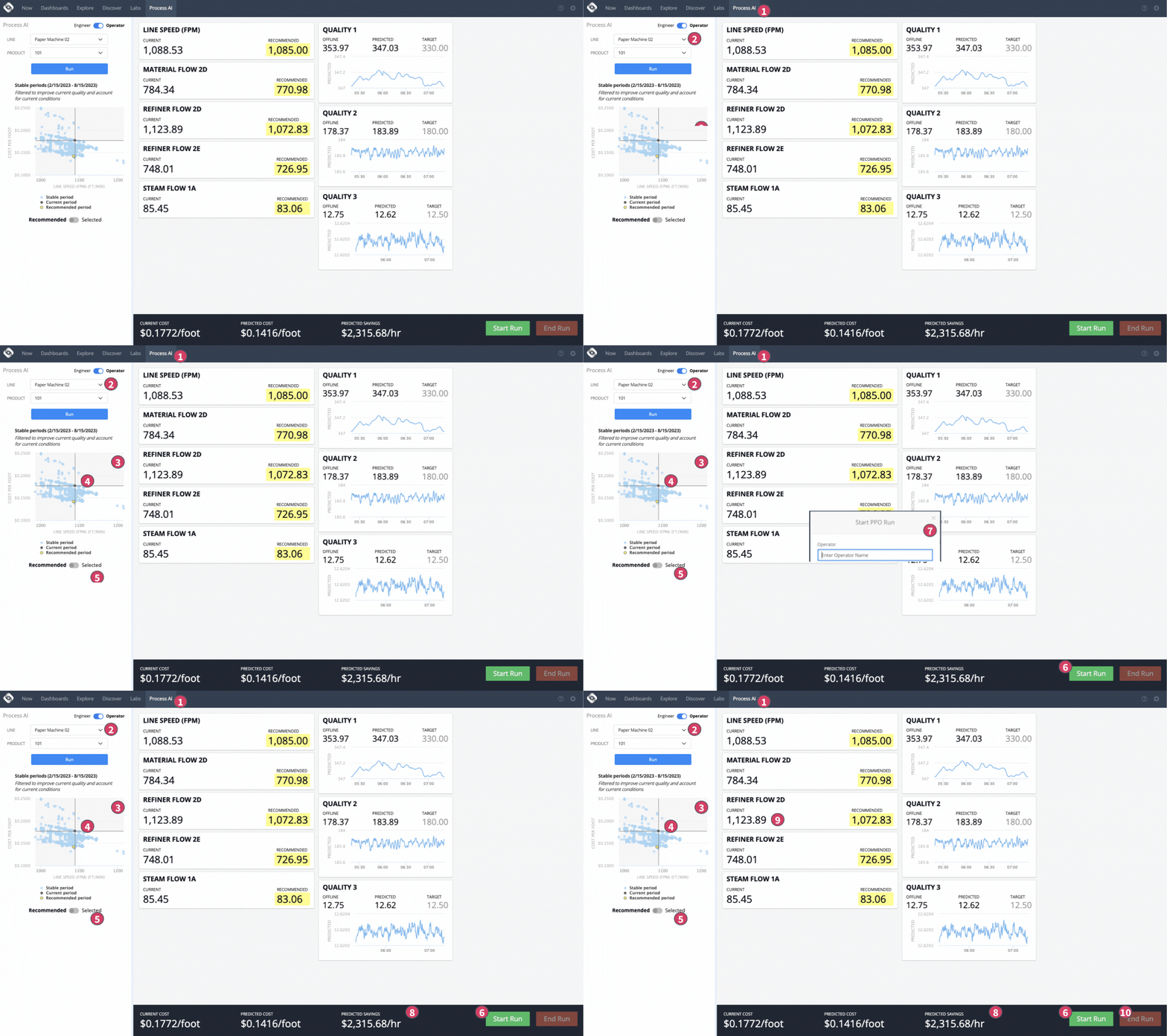
- Navigate to the Process AI tab and select the “Operator” option on the toggle switch
- Select “Line” from the dropdown menu. The current product will automatically load (UX is intended for products that are currently running). Then click the “Run” button
- The dataset and recommendations load. In this state, current values for process settings will update in real time. Recommendations will update as your speed changes to match current conditions on the line.
- Recommendations show offline quality value on hover
- User can select any point on the graph to load that set of recommendations. Toggle the below graph with switch to “Selected”
- User clicks the “Start” button to begin the run
- User is prompted to enter their name for tracking
- Cost savings bar starts tracking total savings and run time
- Current values for Process Settings continue updating, while the recommended values are locked
- User clicks End Run and gets a pop up showing total savings. The page then reverts to the initial state and will begin to surface new recommendations in real-time.
- Process AI Run data and savings are populated in Post-Run Analysis Dashboard
Recorded Demo
Oden Proprietary Model
Predictive Process Optimization (PPO) provides manufacturing process recipe recommendations to minimize cost and increase throughput, while maintaining good quality. The foundation for these recommendations is Oden’s proprietary Recommendation Algorithm. Below is a high-level summary of the design and mechanics of the algorithm.
A top priority of the algorithm is providing recommendations that lead to stable, repeatable, and sustainable production. Hence, the algorithm is designed to have three stages:
- Identify stable periods of performance
- From the stable periods of performance extract candidate process setting recommendations
- Generate the optimized recipe from the process settings of the candidate stable periods
We define stability in terms of two key characteristics of the process: line speed, and product quality. This ensures that the process is both operating in a stable manner, as well as producing high quality and reproducible products. Line speed is often continuously measured as a metric, but quality is typically measured offline using lab tests and is only available at discrete variably sampled intervals. Hence it is not directly available for use in estimating stability.
We address this limitation using Oden’s Predictive Quality models. Predictive Quality is a Machine Learning model that learns important relationships between process variables and the resulting offline quality test values. We use these models to generate a continuous prediction of quality both for live monitoring as well as throughout the available process history. This enables us to evaluate the stability and conformance of quality even between the observed quality test results. These models are further trained and updated periodically to adapt to changing process conditions and constraints.
In the first stage, to determine periods of stable performance, we use a segmentation algorithm that identifies periods in which the speed and predicted quality remain stable and conformant. The segmentation algorithm partitions historical periods into separate periods, and extracts stable segments within which speed and quality remain stable. We only retain those segments that are above a certain duration in length to ensure stable production with sustained stability. In our current implementation, stable segments are required to be at least 15 minutes long. We then use these extracted stable segments as candidates to derive recommended process settings.
As part of the second stage we summarize each segment based on the average value of each process variable during that period of production. We focus on “controllable” process variables, i.e. variables that are tuned to establish a recipe, such that we can recommend all settings needed to replicate optimal performance. These represent our candidate recommendation settings. We use a taxonomy to allow our algorithms to automatically identify which variables are controllable - since this may vary from line to line, and from one process to the others. This ensures that our implementation is scalable. We also calculate the input cost per unit of production for each segment - using information about material use, energy use, and other costly inputs to the process that are available from continuously ingested metrics.
In the third and final stage of the recommendation algorithm, we leverage a search based optimization strategy. PPO aims to optimize the cost-performance tradeoff while ensuring quality. In our experience, outliers in cost and performance are common among the set of candidate recommendation segments. In order to be robust to outliers, we ignore data points that may be outliers with respect to either the cost or the performance.. Typically, we remove around 1% of outliers. For the remaining segments, we generate the recommendation from the candidate segment with the lowest cost.
Because the recommended process settings are derived from the process values from the optimal stable segment, the algorithm has validated these recommended values in multiple ways:
- The recommendation corresponds to periods of stable production
- The recommendation is sustainable for an extended period of time
- Quality is conformant with the specification
- Cost is minimized
It is important to note that the process recommendations are process settings that have been used before. This guarantees that the recommendation is achievable and repeatable.